On this page
Handwriting recognition is an online task. Sign in, review the file transfer and allowance estimate, and confirm before processing. Edits to an opened result are saved in this browser.
Practice with the sample files
The sample groups the first twelve labeled MNIST test digits into three lines. MNIST is credited to Yann LeCun, Corinna Cortes and Christopher Burges. This exercise measures review and recovery on twelve digits.
Use a line you can read independently
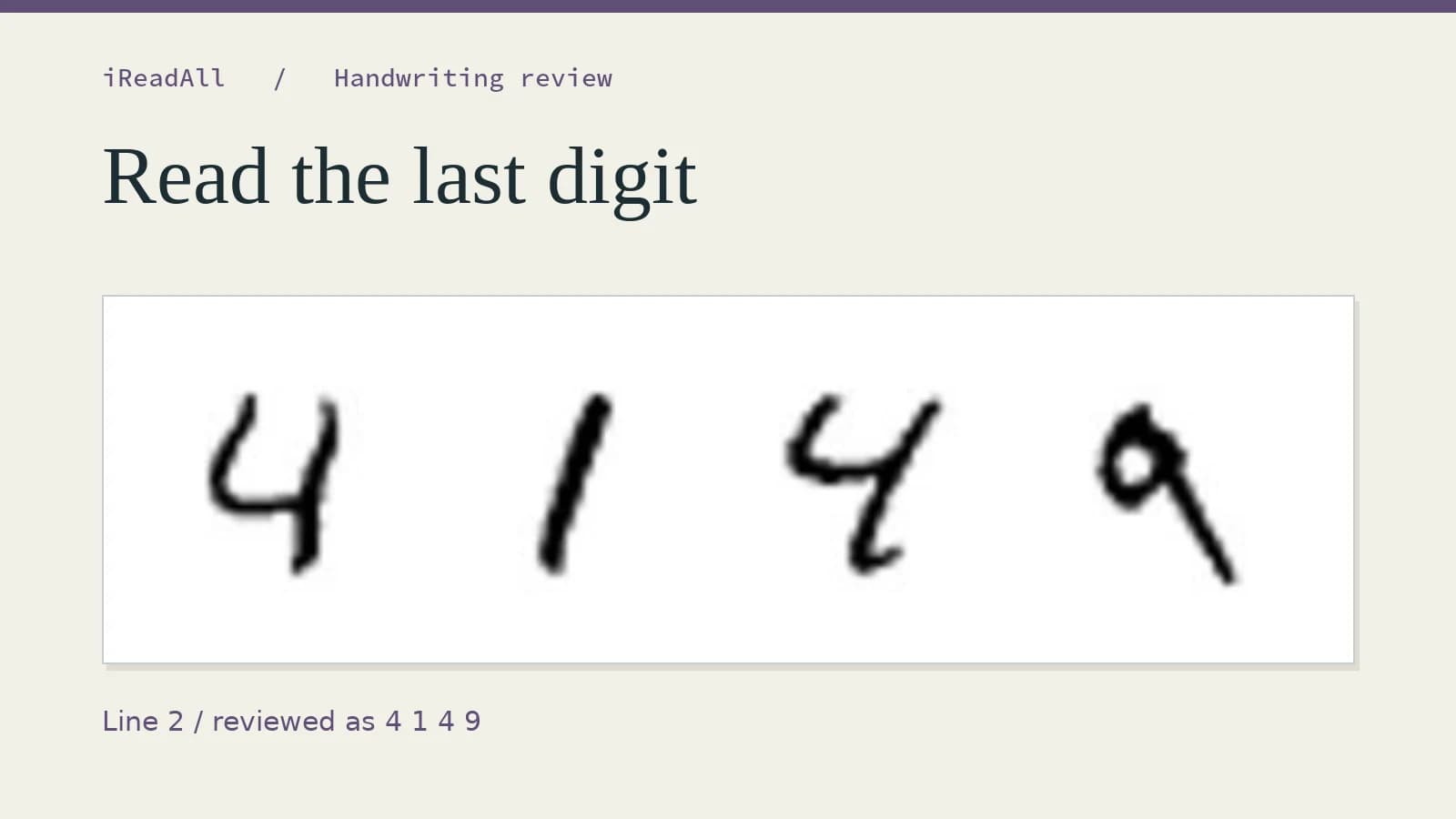
Download the three-page sample and read its second line before opening the reference answers. It ends in a 9 with a rounded loop. The recognition run supplied here returned “4 1 4 a”. That single character changes the transcription even though most of the line looks right.
Submit the lines for recognition
Open Recognize handwritten lines. Select the file, mark the line regions for their respective physical pages and review the estimate. After confirmation, open the completed recognition result from the task center. A clearer crop is worth trying when a region includes part of the next line.
Compare the candidate with the source
In Review handwritten lines, choose Source page 2. Compare the last mark with the original image. Set Reviewed line 2 to “4 1 4 9”. Inspect the other two lines as well and accept each accurate transcription. The model score accompanies its suggestion and gives you no independent proof of an individual character.
4 1 4 a
4 1 4 9
Return to the same draft
Refresh the workspace, then reopen the same recognition result. Check that the corrected 9 is still present. The review belongs to that result version on this device. Download a copy when you need to keep it beyond the lifetime of the local session.
Choose the transcript or the review record
After checking every line, choose Download reviewed transcript. Open the TXT and look for all three physical page labels. Export lines and review status creates JSON with the machine suggestion and the reviewed text, which lets a second reader see exactly what changed. Test your own cursive or script on a small sample before committing a long notebook.
Check the result
- The second reviewed line ends in 9
- The same result retains the correction after a refresh
- TXT includes all three page labels
- JSON retains the original machine suggestion
Source documents
- MNIST dataset card and license · MNIST dataset card
Read about PDF data handling and processing allowances. Find other workflows in PDF Tools.
Samples & worksheets
The sample groups the first twelve labeled MNIST test digits into three lines. MNIST is credited to Yann LeCun, Corinna Cortes and Christopher Burges. This exercise measures review and recovery on twelve digits.
The sample groups the first twelve labeled MNIST test digits into three lines. MNIST is credited to Yann LeCun, Corinna Cortes and Christopher Burges. This exercise measures review and recovery on twelve digits.
The sample groups the first twelve labeled MNIST test digits into three lines. MNIST is credited to Yann LeCun, Corinna Cortes and Christopher Burges. This exercise measures review and recovery on twelve digits.
Questions & answers
Can I fix a handwritten digit before downloading the OCR text?+
Review its line against the source image, enter the correction and verify the other lines before exporting the checked TXT.
Can I see which handwritten characters the OCR model originally suggested?+
Download the review JSON. Each line retains the machine text along with any reviewed transcription.
How this guide was researched
The sample groups the first twelve labeled MNIST test digits into three lines. MNIST is credited to Yann LeCun, Corinna Cortes and Christopher Burges. This exercise measures review and recovery on twelve digits. Handwriting recognition is an online task. Sign in, review the file transfer and allowance estimate, and confirm before processing. Edits to an opened result are saved in this browser.
Evidence checked Nov 26, 2026. Product features can change; dated observations describe the version examined.
Published by iReadAll. AI tools assist research and editing; the team is responsible for verification. Read our editorial policy.
Sources & references
- iReadAll Recognize handwritten lines inputs and processing limitsiReadAll · Checked 2026-11-26
- PDF data handling and retentioniReadAll · Checked 2026-11-26
- PDF processing allowancesiReadAll · Checked 2026-11-26
- MNIST dataset card and licenseMNIST dataset card · Checked 2026-11-26
Cite this guide
iReadAll Product & Editorial Team. “How to Review Handwriting OCR and Export Corrected Text.” iReadAll, Nov 26, 2026. https://ireadall.ai/blog/review-handwriting-ocr