On this page
1. Open a page while you are connected
Open The Listening Test Book in the PDF reader. Move to a page of prose and press Listen. Follow a sentence on its original page. With your own scanned handout, recognize the text first and check the reading order across columns.
A visitor can try 20,000 Reader characters once across the readers. A signed-in Free account has 200,000 Reader characters each month. Sign in before generating a file and check the remaining allowance if you are preparing several chapters.
2. Save the page or range to your device
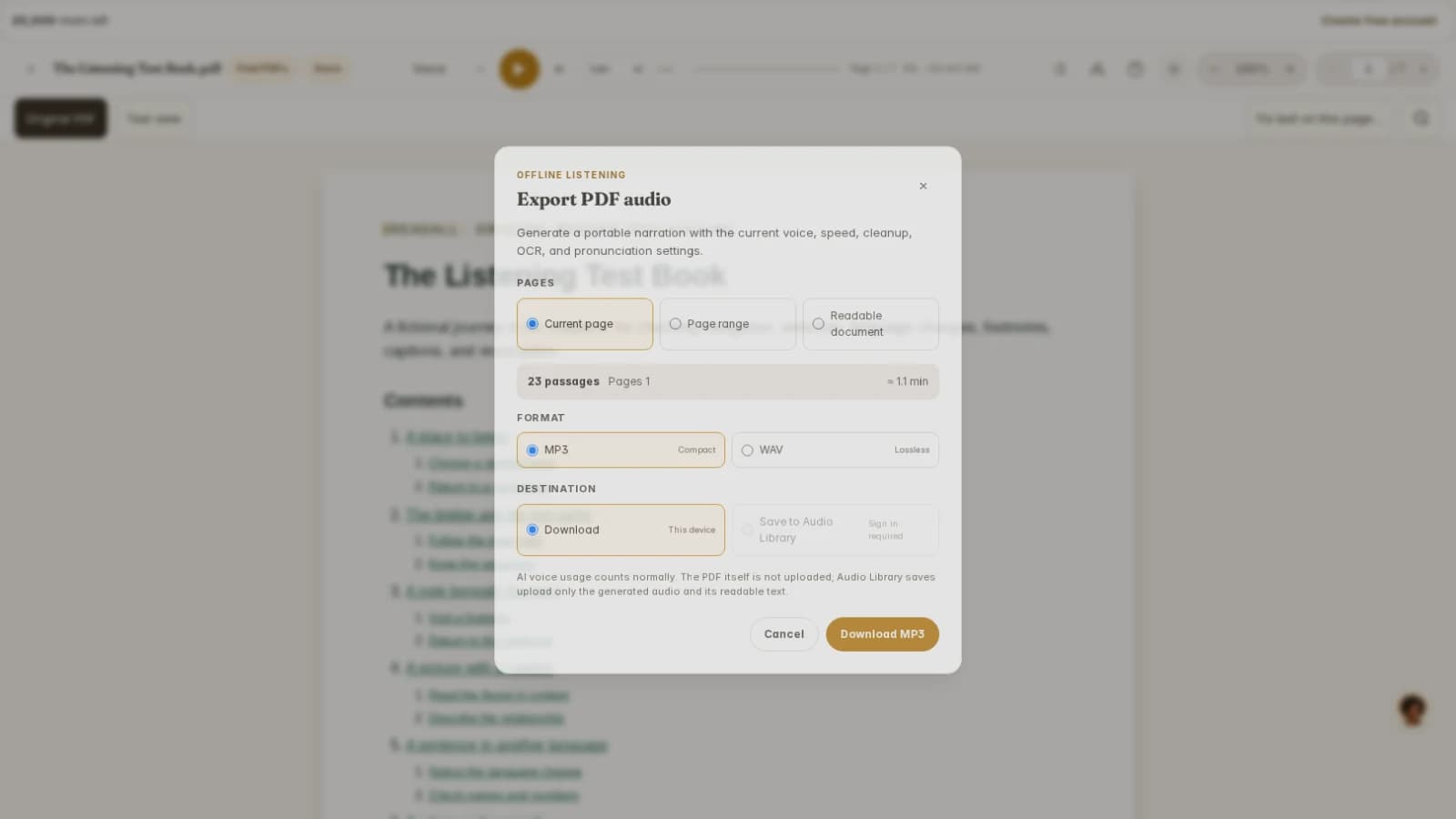
- In More playback controls, choose Prepare this page for offline listening. You can also open Settings and choose Export under Offline audio.
- Choose Current page for the first check. Use Page range for a chapter. The dialog shows which passages and pages are ready.
- Choose MP3 for a compact file or WAV for lossless audio. Select Download, then start generation. Keep the connection until the download finishes.
Long selections are split into parts. Save each finished part before starting the next. To continue later, reopen the same PDF in the same browser and use Settings → Offline audio → Export to resume from the next checkpoint.
3. Listen in airplane mode
Open the downloaded file from Files on iPhone, Downloads on Android or your computer’s downloads folder. Disconnect, reopen the file in a local audio player and seek near the end. If it is still a cloud-only placeholder, reconnect and save a local copy. Keep the PDF beside it if you need to refer to figures or citations.
If a passage sounds wrong, compare it with the original page, correct its recognized text or pronunciation, then prepare that page again. Generating new speech or preparing the next part needs a connection.
- 01Download
Save the finished MP3 or WAV in local storage.
- 02Disconnect
Turn on airplane mode and open the file from Files or Downloads.
- 03Seek
Play a sentence near the end to confirm the entire part is available.
Samples & worksheets
The same seven-page public PDF used to illustrate the export controls.
Questions & answers
Can I listen to a PDF on a flight?+
Yes. Generate the audio and download it to your device before boarding. Test a local MP3 or WAV in airplane mode.
Can I download PDF audio without an account?+
Guest playback has a one-time allowance of 20,000 characters. Sign in to generate a downloadable file using your account’s Reader allowance.
Can I save just part of a long document?+
Yes. Choose Current page or Page range. The reader divides long selections into resumable parts.
How this guide was researched
Evidence checked Nov 22, 2026. Product features can change; dated observations describe the version examined.
Published by iReadAll. AI tools assist research and editing; the team is responsible for verification. Read our editorial policy.
Sources & references
Cite this guide
iReadAll Product & Editorial Team. “How to Listen to a PDF Offline on a Flight.” iReadAll, Nov 22, 2026. https://ireadall.ai/blog/offline-pdf-audio-reader